A plugin update, a new page or an AI-assisted edit can save correctly and still break the visitor’s next step. Define the customer path before changing the site. The release decision should depend on the page people can use, not only the editor’s success message.
Write a release card before editing
Identify the affected URLs, the intended visible change and the fields that should stay unchanged. Include the page language, mobile layout and relevant form or button. Name the person who can make the change and the person who checks the result.
Choose the smallest change that solves the problem. A text correction should not quietly become a theme replacement. If the change involves code or layout, use a suitable preview or staging process before exposing it to visitors.

Keep the recovery scope precise
| Release item | Record |
|---|---|
| Scope | URLs, content or component being changed. |
| Expected result | What a visitor should see and do. |
| Preserved state | Forms, access, languages and current records. |
| Recovery | Previous version and responsible operator. |
| Acceptance | Checks and evidence required to finish. |
Understand what a restore would overwrite. Restoring an entire database to fix a heading could also remove later submissions or edits. Match recovery to the change and preserve newer data. Backups matter, but they are not permission to overwrite unrelated work.
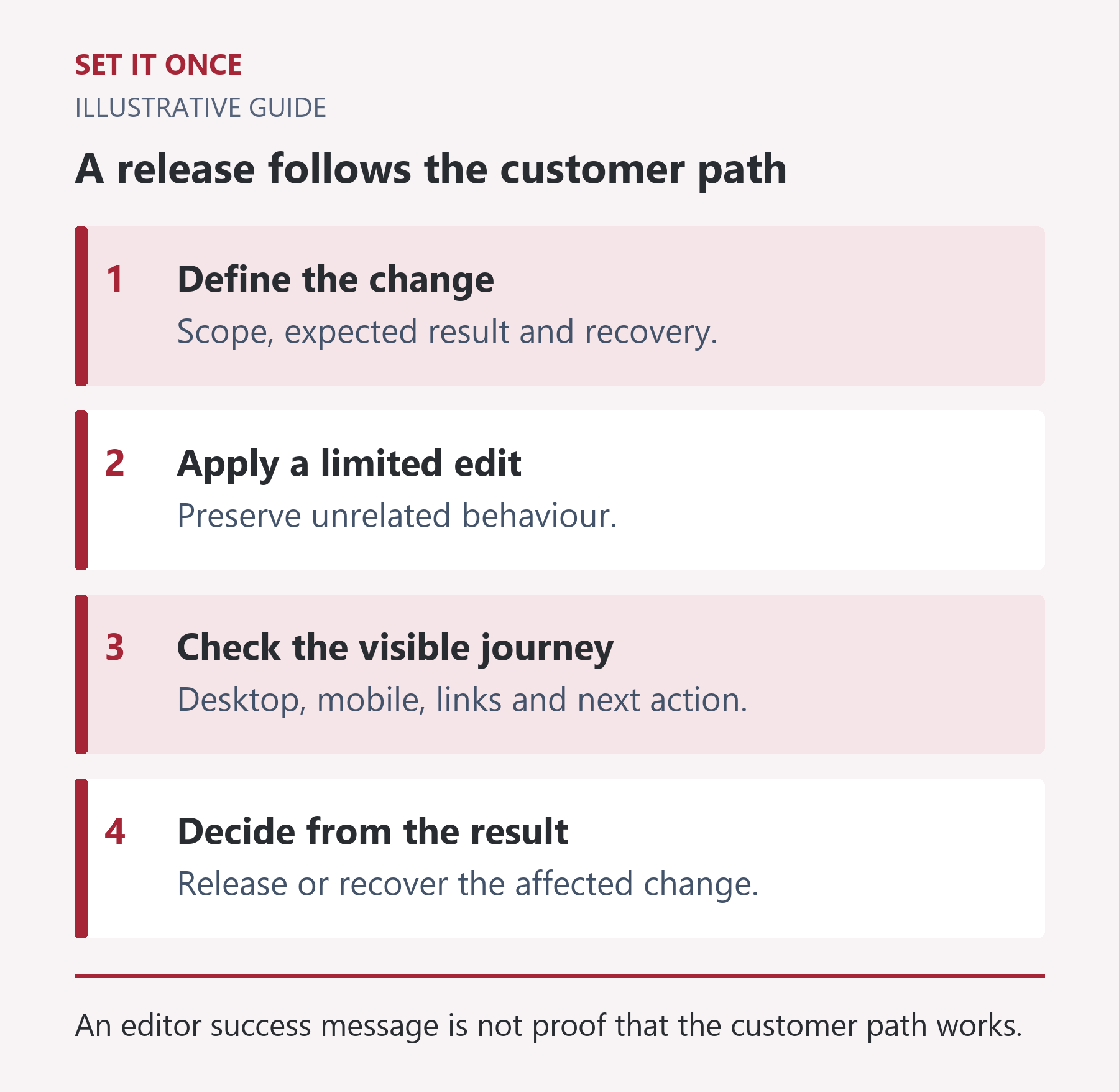
Original illustrative guide: Set It Once. An editor success message is not proof that the customer path works.
Read the text version
- Define the change. Scope, expected result and recovery.
- Apply a limited edit. Preserve unrelated behaviour.
- Check the visible journey. Desktop, mobile, links and next action.
- Decide from the result. Release or recover the affected change.
Walk the visitor’s route
Open the actual public page without relying on an administrator view. Read the heading, find the offer, follow the relevant internal link and reach the next step. Check the corresponding language version and a real narrow viewport.
For a form change, verify labels, required fields, error messages and the stored result using an authorised synthetic test. Confirm where the enquiry is retained. Do not treat a thank-you screen as proof of notification delivery, and do not send real customer messages just to test the release.
Separate deployment from acceptance
Hypothetical example: an updated contact button opens the correct form on desktop, but a mobile overlay prevents tapping it. The update deployed; the customer path failed. Record the difference and repair the smallest affected part.
- Verify the changed preview and record the version.
- Apply the agreed change.
- Check the anonymous live page, including cached output where relevant.
- Record results and any remaining uncertainty.
Keep a concise handoff with the live state and recovery reference. WordPress’s backup guidance explains why a full restore requires both files and the database. The release card here is an original operational checklist, not a replacement for your host’s recovery procedure.
Match recovery to the actual change
For a hypothetical heading correction, preserve the previous heading and page revision. For a scoped CSS repair, preserve the affected rule and identify its page scope. A plugin update has a broader recovery surface: code, compatibility and potentially changed data. These situations should not share an automatic “restore yesterday’s database” instruction.
Imagine five new enquiries arrived after the last backup. A full database restore to undo a visual error could remove those later records. Before choosing recovery, list what it would overwrite and whether a narrower reversal is available. Involve the responsible operator when data migration or external effects make rollback uncertain.
Follow a representative route with explicit checkpoints
For an illustrative service-page release, start at the anonymous landing page, open the relevant service, read its conditions, follow the CTA and reach the form. At each step record the destination and expected visible result. Repeat at desktop and a narrow mobile width. A screenshot of the changed component alone misses a broken link one step later.
Check the corresponding language route if shared navigation or content changed. Open a second representative template when editing shared CSS or scripts. Use approved synthetic form checks only when needed and authorised; ordinary copy edits do not require sending unnecessary messages or creating real transactions.
Distinguish a stale cache from a failed save
If the editor shows new content but the anonymous page shows old text, first verify the saved target and inspect the public route. Then investigate the relevant page cache or delivery layer. Repeating the edit without diagnosis can create confusion or overwrite a later change.
After a targeted cache refresh, reopen the exact customer URL and check its canonical destination. Record the visible result and version, rather than merely the cache tool’s success message. Finish the release card with passed checks, any known limitation and the recovery reference. The release is reviewable when another person can distinguish what was deployed, what visitors received and what remains untested.
Take one practical next step
For a specific website change that needs a small tool or implementation, discuss feasibility through custom development. Scope, timing and price are agreed before work starts. An enquiry does not place an order or guarantee a result.
Sources and further reading
Quick answers
Frequently asked questions
Does a staging pass guarantee the live result?
No. Live data, caching and settings may differ. Check the public customer path after deployment.
Should every change restore the whole site if it fails?
No. Use the smallest suitable recovery and consider newer submissions or edits before any database restore.
What proves a form notification works?
A controlled test with the stored submission and actual intended delivery verified. A success screen alone is insufficient.

About the author
Martin Iliev
Martin builds Set It Once to help people spend less time on repeated work. His guides explain what you can try, how to check the result and where the limits are.
More about Martin